 bestdealzone


Price: $22.99
(as of Sep 07, 2026 22:27:31 UTC – Details)
Product description
The video showcases the product in use.The video guides you through product setup.The video compares multiple products.The video shows the product being unpacked. UGREEN Tracker Card


1 Recharge Once A Year
2 IP68 Waterproof
3 Global Positioning
4 Loud Alarm


1 Close-Range Search
2 Remote Tracking
3 Left-Behind Remind
4 Find Car in Parking Lot
How to use?


UGREEN FineTrack Slim Q & A
Q1 Why doesn’t anything happen when I press the button on the UGREEN FineTrack for the first A1 The button is not touch-sensitive. Hold the UGREEN FineTrack Slim in your hand and firmly press the power button with your thumb for 2 seconds. A beep and indicator light will confirm it’s powered on. The device automatically powers on every time it is connected to a charger. Q2 What devices are supported for pairing? A2 Supports pairing with iPhone/iPad. Each iPhone/iPad can pair with up to 32 trackers. MacBook does not support pairing but can view the tracker’s location via the Find My app. System requirements: iOS 14.5 or above / iPadOS 14.5 or above / macOS 12.5 or above. Q3 Why can’t I add the UGREEN FineTrack to the Apple Find My App? A3 Check your iPhone/iPad to ensure the system version is supported, Bluetooth is on, and the network is functioning. Factory Reset: While powered on, quickly press the button 5 times. After hearing 3 consecutive beeps, press and hold the button for 6 seconds until you hear 2 beeps. Then open the Find My App and follow the steps to add the device again. Q4 How to rebind a paired tracker to another iPhone? A4 Method 1: If iPhone1 and the paired tracker are nearby, go to iPhone1’s Find My app and select “Remove Item” to unbind the device. It can then be paired with another iPhone2. Method 2: If iPhone1 and the tracker are far apart, first remove the device in iPhone1’s Find My app, then reset the tracker to factory settings: quickly press the button 5 times, hear 3 beeps, then press and hold for 6 seconds until you hear 2 beeps. The tracker can now be paired with another iPhone2. Q5 What is the Find My App? Can Android users use UGREEN FineTrack Slim? A5 No, UGREEN FineTrack Slim only supports Apple devices and is not compatible with Android. “Find My” is a pre-installed app on Apple devices used by millions daily to locate items. Q6 Why does the indicator light turn off while charging? A6 The product uses an ultra-low power chip. Battery life can last up to 1 year. It is nearly fully charged upon delivery, so charging is usually not necessary upon receipt. When charging, the indicator light turns on briefly and then off, indicating full battery. You can check the battery level in the Find My app. Q7 Why can’t the UGREEN FineTrack play sound? A7 Sound can be played to locate the tracker when it is within close range (approx. 10 – 20 meters), depending on the environment. Sound cannot be played at long distances, but you can track it via the updated map location. Q8 Why can’t I enter map navigation? A8 When the tracker is close to the phone, you may not be able to enter navigation mode. Navigation is designed for locating items at a distance.
UGREEN FineTrack:The World’s First Tracker Superstore.
Add to Cart
Add to Cart
Add to Cart
Add to Cart
Customer Reviews
4.3 out of 5 stars 4,647
4.3 out of 5 stars 185
4.6 out of 5 stars 472
4.2 out of 5 stars 2,724
4.5 out of 5 stars 602
4.4 out of 5 stars 539
4.4 out of 5 stars 3,890
Compatible systems
iOS Only
iOS or Android
iOS Only
iOS or Android
iOS Only
iOS Only
iOS Only
Battery Life
12 Months
7 Years
7 Years
12 Months
12 Months
7 Years
24 Months
Charging Type
Magnetic Charging
Disposable Batteries
Disposable Batteries
USB C Charging
Magnetic Charging
Disposable Batteries
Replaceable Battery
Battery
Li-ion, non-replace
CR2045, non-replace
CR2045, non-replace
CR2032, non-replace
Li-ion, non-replace
Li-MnO2, non-replace
CR2032, replaceable
Works with App
Find My
Apple Find My
Find My
Find My&Find hub
Find My
Find My
Find My
Features
IP68, Ultra-thin
Ultra-thin,RFID Shielding
IP68, Ornament locator
UL 4200A Certified
IP68, Magnetic Charging
Long battery life
UL 4200A Certified
Accessories
Lanyard, USB-A Cable
–
Hanging rope, Pin
Lanyard, USB-A Cable
Lanyard
Lanyard,Pin,Sticker
Lanyard,Pin,Sticker
Size
84.6×53×1.7mm
85.6×54×1.9mm
39*39mm
36×36×7.4mm
84.6×53×2.6mm
84.6×53×2.6mm
36×36×7.4mm
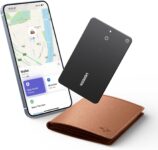
Ultra-Thin 0.07-Inch Credit Card Design: This FineTrack Slim wallet tracking card is designed to be the size of a credit card, with a thickness of only 0.07 inches (1.8 mm). It fits perfectly into any wallet card slot or passport holder, seamlessly integrating without adding any thickness. It is the perfect travel companion or everyday carry item.
Easy Find with Apple Find My(iOS Only):Open the pre-installed Find My App and pair your wallet tracking card with your iPhone or iPad with a single tap. Easily locate and track your wallet, luggage, and other valuables. (Note: Compatible with iOS devices only, not for Android.)
Magnetic Charging & Long Battery Life: Unlike ordinary trackers , this smart wallet tracking card comes with a dedicated charging cable, eliminating the need for a separate purchase. The built-in rechargeable battery provides over 5 years of battery life. A mere 2-hour charge provides up to 12 months of use, offering a year of tracking and security for your wallet
Smart Tracking Made Easy: Whether Bluetooth tracking card is nearby or far away, locate it easily with the Find My app. When within Bluetooth range, play a sound to quickly find the wallet tracker card; when out of range, the Apple Find My network uses its vast ecosystem of Apple devices to provide the item finder’s latest location. Enjoy global tracking with Apple’s Find My network without any subscription fees.
Lost Item Alerts & Lost Mode: When your wallet tracker card moves out of range, the Apple Find My app sends an instant lost alert with the last known location. If your item is confirmed lost, you can activate Lost Mode and leave your contact information so nearby Apple devices can remotely access it and help locate your tracker card, making recovery quick and easy.
TIP1: The red light will stay on and turn off after fully charged. The product is fully charged when comes, it may will flash a red light and go off when charging for the first time, not mean the device cannot work. TIP2: With iOS 17 or later, you can also share your tracker card’s location with family members, so everyone can help keep items safe.
Customers find the wallet tracker to be better than an AirTag and appreciate its slim design, being about as thick as two credit cards. The device is easy to set up and works well with Find My Phone, though some report it stops working unexpectedly. Battery life receives mixed feedback, with some praising its amazing life while others note it’s shorter than claimed. Customers disagree on whether the product is worth the price, and connectivity experiences are mixed, with some reporting unreliable Bluetooth connections.